hahaha
What does the hahaha emoji mean?
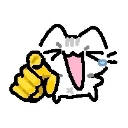
A laughing cat points directly at you to mock your hilarious blunder.
This emoji features a stylized, doodle-like cat laughing hysterically while pointing a finger at the viewer. It is a popular reaction image used in Discord servers to playfully call out someone's mistake, bad take, or embarrassing moment. The combination of the pointing gesture and the laughing expression makes it the perfect tool for lighthearted roasting.
When to use it
- Laughing at someone making a silly mistake
- Pointing out a friend's ridiculous bad take
- Mocking a funny fail in the chat
- Teasing someone for their obvious blunder
Also known as:
:AHAHAHAHA:
Part of these collections
Related emoji searches
More inspired emojis
Embed & share
How to add this emoji
Add to Discord
- Click Add to my server above and pick a Discord server you manage (CommunityOne must be installed).
- Or download the file: open Discord → Server Settings → Emoji → Upload Emoji.
- Give it a name and save. You need Manage Server (or Create Expressions) permission.
Add to Slack
- Download the hahaha image.
- Open the Slack emoji picker and click Add Emoji.
- Upload the file, name it, and save.
Add to Revolt/Stoat
- Download the hahaha image.
- Open Server Settings → Emojis in Revolt or Stoat.
- Upload the file and name your new emoji.
Add to Guilded
- Download the hahaha image.
- Go to Server Settings → Emotes in Guilded.
- Upload the file and give it a name.











