bots
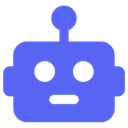
What does the bots emoji mean?
The quintessential icon for all things automated and digital.
This classic robot head emoji is the standard visual shorthand for bots on Discord. It is frequently used to identify automated accounts, signal technical support, or jokingly refer to someone acting like a mindless machine.
When to use it
- Identifying automated bot accounts in chat
- Signaling technical issues with server bots
- Joking about someone acting like a robot
- Marking automated messages in a channel
Also known as:
:Discord_Bots:
Part of these collections
Related emoji searches
More inspired emojis
Embed & share
How to add this emoji
Add to Discord
- Click Add to my server above and pick a Discord server you manage (CommunityOne must be installed).
- Or download the file: open Discord → Server Settings → Emoji → Upload Emoji.
- Give it a name and save. You need Manage Server (or Create Expressions) permission.
Add to Slack
- Download the bots image.
- Open the Slack emoji picker and click Add Emoji.
- Upload the file, name it, and save.
Add to Revolt/Stoat
- Download the bots image.
- Open Server Settings → Emojis in Revolt or Stoat.
- Upload the file and name your new emoji.
Add to Guilded
- Download the bots image.
- Go to Server Settings → Emotes in Guilded.
- Upload the file and give it a name.











