e_heehee
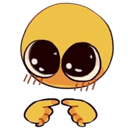
What does the e_heehee emoji mean?
The ultimate expression of shy, bashful, or mischievous hesitation.
This emoji features the iconic 'shy emoji' character, known for its oversized, glossy eyes and fingers pressed together in a bashful gesture. It is a staple of internet culture, frequently used to convey a mix of nervousness, feigned innocence, or a 'just asking' attitude when someone is about to drop a spicy take or make a request. It is perfect for Discord servers when you want to act coy or subtly manipulate the conversation.
When to use it
- Asking for a favor in a shy way
- Acting innocent after posting something very controversial
- Expressing bashful hesitation before sharing an opinion
- Trying to look cute to get your way
Part of these collections
Related emoji searches
More inspired emojis
Embed & share
How to add this emoji
Add to Discord
- Click Add to my server above and pick a Discord server you manage (CommunityOne must be installed).
- Or download the file: open Discord → Server Settings → Emoji → Upload Emoji.
- Give it a name and save. You need Manage Server (or Create Expressions) permission.
Add to Slack
- Download the e_heehee image.
- Open the Slack emoji picker and click Add Emoji.
- Upload the file, name it, and save.
Add to Revolt/Stoat
- Download the e_heehee image.
- Open Server Settings → Emojis in Revolt or Stoat.
- Upload the file and name your new emoji.
Add to Guilded
- Download the e_heehee image.
- Go to Server Settings → Emotes in Guilded.
- Upload the file and give it a name.











