big-head-baby-meme
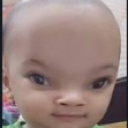
What does the big-head-baby-meme emoji mean?
A hilariously distorted, big-headed baby face perfect for mocking absurdity.
This image features a classic 'big head' filter effect applied to a baby's face, creating a surreal and comical appearance. It is widely used in Discord servers and meme culture to react to nonsensical statements, express confusion, or simply troll friends with its absurd proportions.
When to use it
- Reacting to someone saying something completely stupid
- Mocking a friend for having a bad take
- Expressing confusion at a bizarre chat message
- Adding humor to a tense or serious discussion
Part of these collections
Related emoji searches
More inspired emojis
Embed & share
How to add this emoji
Add to Discord
- Click Add to my server above and pick a Discord server you manage (CommunityOne must be installed).
- Or download the file: open Discord → Server Settings → Emoji → Upload Emoji.
- Give it a name and save. You need Manage Server (or Create Expressions) permission.
Add to Slack
- Download the big-head-baby-meme image.
- Open the Slack emoji picker and click Add Emoji.
- Upload the file, name it, and save.
Add to Revolt/Stoat
- Download the big-head-baby-meme image.
- Open Server Settings → Emojis in Revolt or Stoat.
- Upload the file and name your new emoji.
Add to Guilded
- Download the big-head-baby-meme image.
- Go to Server Settings → Emotes in Guilded.
- Upload the file and give it a name.











