xdBOYE
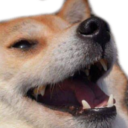
What does the xdBOYE emoji mean?
A Shiba Inu dog laughing hysterically at your terrible jokes.
This emoji features a Shiba Inu with a wide, open-mouthed grin, commonly known as the 'Kek' dog or a variation of the Doge meme. It is widely used in Discord and gaming communities to express genuine laughter, mockery, or to react to something absurdly funny in the chat.
When to use it
- Laughing at a friend's hilariously bad joke
- Reacting to a chaotic moment in gaming
- Mocking someone for saying something truly ridiculous
- Expressing pure amusement at a funny meme
Part of these collections
Related emoji searches
More inspired emojis
Embed & share
How to add this emoji
Add to Discord
- Click Add to my server above and pick a Discord server you manage (CommunityOne must be installed).
- Or download the file: open Discord → Server Settings → Emoji → Upload Emoji.
- Give it a name and save. You need Manage Server (or Create Expressions) permission.
Add to Slack
- Download the xdBOYE image.
- Open the Slack emoji picker and click Add Emoji.
- Upload the file, name it, and save.
Add to Revolt/Stoat
- Download the xdBOYE image.
- Open Server Settings → Emojis in Revolt or Stoat.
- Upload the file and name your new emoji.
Add to Guilded
- Download the xdBOYE image.
- Go to Server Settings → Emotes in Guilded.
- Upload the file and give it a name.











