mute
What does the mute emoji mean?
When you just need to silence the chaos in the chat.
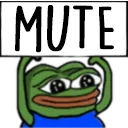
This emoji features the iconic Pepe the Frog character with his hands held up to his ears, signaling a desire for silence or to mute a conversation. It is a staple in gaming communities and Discord servers for expressing frustration with loud voice chat or simply requesting quiet during intense moments. The bold 'MUTE' text makes it an unmistakable way to tell others to stop talking.
When to use it
- Silencing someone who is talking too much
- Requesting quiet during a serious gaming match
- Expressing annoyance at loud voice chat users
- Telling a chat member to stop spamming
Also known as:
:grindernice_pepe: :g_pepe_mute: :pepe1mute:
Part of these collections
Related emoji searches
More inspired emojis
Embed & share
How to add this emoji
Add to Discord
- Click Add to my server above and pick a Discord server you manage (CommunityOne must be installed).
- Or download the file: open Discord → Server Settings → Emoji → Upload Emoji.
- Give it a name and save. You need Manage Server (or Create Expressions) permission.
Add to Slack
- Download the mute image.
- Open the Slack emoji picker and click Add Emoji.
- Upload the file, name it, and save.
Add to Revolt/Stoat
- Download the mute image.
- Open Server Settings → Emojis in Revolt or Stoat.
- Upload the file and name your new emoji.
Add to Guilded
- Download the mute image.
- Go to Server Settings → Emotes in Guilded.
- Upload the file and give it a name.











