hmmNoted
What does the hmmNoted emoji mean?
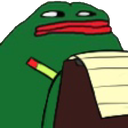
Pepe is taking notes on your questionable behavior.
This emoji features the iconic Pepe the Frog character intently scribbling on a notepad, often used in Discord chats to signify that someone is 'taking notes' on a controversial or hilarious statement. It serves as a humorous way to tell a user that their message has been noted, archived, or is being judged for future reference. It is a staple in meme-heavy communities for responding to hot takes or absurd claims.
When to use it
- Acknowledging a user's controversial or funny statement
- Threatening to expose someone's bad chat history
- Pretending to record important information for later
- Mocking someone for saying something completely ridiculous
Also known as:
:7455pepenoted: :mmmnota: :Pepe_noted: :pepenoted:
Part of these collections
Related emoji searches
More inspired emojis
Embed & share
How to add this emoji
Add to Discord
- Click Add to my server above and pick a Discord server you manage (CommunityOne must be installed).
- Or download the file: open Discord → Server Settings → Emoji → Upload Emoji.
- Give it a name and save. You need Manage Server (or Create Expressions) permission.
Add to Slack
- Download the hmmNoted image.
- Open the Slack emoji picker and click Add Emoji.
- Upload the file, name it, and save.
Add to Revolt/Stoat
- Download the hmmNoted image.
- Open Server Settings → Emojis in Revolt or Stoat.
- Upload the file and name your new emoji.
Add to Guilded
- Download the hmmNoted image.
- Go to Server Settings → Emotes in Guilded.
- Upload the file and give it a name.











