skey
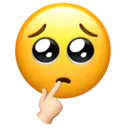
What does the skey emoji mean?
A shy, bashful emoji that perfectly captures that 'oops, did I say that out loud?' energy.
This emoji features the classic 'pleading face' eyes combined with a finger-to-mouth gesture, creating a look of bashful hesitation or coy curiosity. It is widely used in Discord and Slack communities to signal shyness, feigned innocence, or when someone is nervously waiting for a response after dropping a bold comment. It serves as the ultimate tool for playful flirting or diffusing tension with a bit of awkward charm.
When to use it
- Expressing bashful shyness during a conversation
- Showing coy hesitation before asking a question
- Reacting to a slightly awkward or bold statement
- Acting innocent after making a mischievous comment
Also known as:
:emoji: :Opsie: :y_opss: :EEE1001452324486593511424: :hpp:
Part of these collections
Related emoji searches
More inspired emojis
Embed & share
How to add this emoji
Add to Discord
- Click Add to my server above and pick a Discord server you manage (CommunityOne must be installed).
- Or download the file: open Discord → Server Settings → Emoji → Upload Emoji.
- Give it a name and save. You need Manage Server (or Create Expressions) permission.
Add to Slack
- Download the skey image.
- Open the Slack emoji picker and click Add Emoji.
- Upload the file, name it, and save.
Add to Revolt/Stoat
- Download the skey image.
- Open Server Settings → Emojis in Revolt or Stoat.
- Upload the file and name your new emoji.
Add to Guilded
- Download the skey image.
- Go to Server Settings → Emotes in Guilded.
- Upload the file and give it a name.











