tu_gay
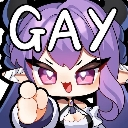
What does the tu_gay emoji mean?
A playful anime-style character pointing directly at the viewer with a cheeky label.
This emoji features a stylized anime character with purple hair and horns, pointing a finger forward with the word 'GAY' displayed prominently above. It is commonly used in Discord communities as a lighthearted, humorous way to tease friends, respond to questionable comments, or jokingly label someone's behavior. The chibi-inspired art style makes it a popular choice for expressive, meme-centric server communication.
When to use it
- Calling out a friend for being silly
- Responding to a funny or questionable message
- Teasing someone in a lighthearted Discord chat
- Adding humor to a casual group conversation
Also known as:
:May_gay: :CALLING_GAY: :gay: :gay2: :74405a1c734de62616f09f7c7be21275: :emoji_40: :emoji_85:
Part of these collections
Related emoji searches
More inspired emojis
Embed & share
How to add this emoji
Add to Discord
- Click Add to my server above and pick a Discord server you manage (CommunityOne must be installed).
- Or download the file: open Discord → Server Settings → Emoji → Upload Emoji.
- Give it a name and save. You need Manage Server (or Create Expressions) permission.
Add to Slack
- Download the tu_gay image.
- Open the Slack emoji picker and click Add Emoji.
- Upload the file, name it, and save.
Add to Revolt/Stoat
- Download the tu_gay image.
- Open Server Settings → Emojis in Revolt or Stoat.
- Upload the file and name your new emoji.
Add to Guilded
- Download the tu_gay image.
- Go to Server Settings → Emotes in Guilded.
- Upload the file and give it a name.











