happy
¿Qué significa el emoji happy?
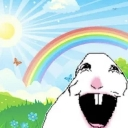
A surreal, wide-mouthed rabbit laughing in a bright, idyllic meadow.
This emoji features the 'Happy Rabbit' meme, a distorted, surreal take on a bunny that contrasts a chaotic, unsettling expression with a hyper-cheerful, idyllic background. It is frequently used in Discord servers to express ironic joy, overwhelming absurdity, or to mockingly react to something that is trying too hard to be wholesome.
Cuándo usarlo
- Reacting to an absurdly wholesome message
- Expressing ironic joy in a chaotic chat
- Mocking someone who is acting overly cheerful
- Highlighting the surreal nature of a conversation
Also known as:
:Happy_yainbow: :emoji_9: :emoji_17:
Parte de estas colecciones
Related emoji searches
More inspired emojis
Insertar y compartir
Cómo añadir este emoji
Añadir a Discord
- Haz clic en Añadir a mi servidor arriba y elige un servidor de Discord que administres (CommunityOne debe estar instalado).
- O descarga el archivo: abre Discord → Ajustes del servidor → Emoji → Subir emoji.
- Dale un nombre y guarda. Necesitas el permiso Administrar servidor (o Crear expresiones).
Añadir a Slack
- Descarga la imagen de happy.
- Abre el selector de emojis de Slack y haz clic en Añadir emoji.
- Sube el archivo, ponle un nombre y guarda.
Añadir a Revolt/Stoat
- Descarga la imagen de happy.
- Abre Ajustes del servidor → Emojis en Revolt o Stoat.
- Sube el archivo y pon nombre a tu nuevo emoji.
Añadir a Guilded
- Descarga la imagen de happy.
- Ve a Ajustes del servidor → Emotes en Guilded.
- Sube el archivo y dale un nombre.











