party_dog (Animé)
Que signifie l’emoji party_dog ?
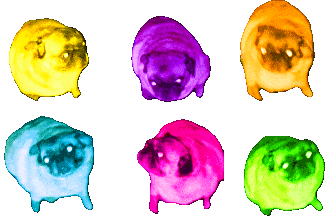
A chaotic, neon-colored quartet of pugs ready to bring the party to your chat.
This emoji features the iconic 'spinning pug' meme, famously known as the 'Gopnik Pug' or 'Spinning Pug' in various internet circles. By applying a high-contrast, deep-fried color filter to four variations of the pug, it creates a chaotic and energetic vibe perfect for Discord servers that thrive on meme culture and high-intensity reactions.
Quand l’utiliser
- Expressing overwhelming excitement during a chaotic moment
- Reacting to a bizarre or nonsensical chat message
- Adding visual chaos to a celebratory server event
- Highlighting a funny or absurd conversation thread
Also known as:
:Partydog: :m_party_pug: :neonpartypug: :party_pug_dance:
Dans ces collections
Related emoji searches
More inspired emojis
Intégrer et partager
Comment ajouter cet emoji
Add to Discord
- Cliquez sur Ajouter à mon serveur ci-dessus et choisissez un serveur Discord que vous gérez (CommunityOne doit être installé).
- Ou téléchargez le fichier : ouvrez Discord → Paramètres du serveur → Emoji → Importer un emoji.
- Donnez-lui un nom et enregistrez. Vous avez besoin de la permission Gérer le serveur (ou Créer des expressions).
Ajouter à Slack
- Téléchargez l’image party_dog.
- Ouvrez le sélecteur d’emojis Slack et cliquez sur Ajouter un emoji.
- Importez le fichier, nommez-le et enregistrez.
Ajouter à Revolt/Stoat
- Téléchargez l’image party_dog.
- Ouvrez Paramètres du serveur → Emojis dans Revolt ou Stoat.
- Importez le fichier et nommez votre nouvel emoji.
Ajouter à Guilded
- Téléchargez l’image party_dog.
- Allez dans Paramètres du serveur → Emotes dans Guilded.
- Importez le fichier et donnez-lui un nom.











