10DontForgettoVerify
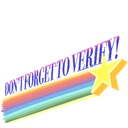
What does the 10DontForgettoVerify emoji mean?
A nostalgic, retro-style reminder to keep your facts straight.
This emoji features a classic 90s-style rainbow shooting star graphic paired with the text 'DON'T FORGET TO VERIFY!'. It is frequently used in Discord servers to playfully remind users to check their sources, verify information, or complete server verification steps in a lighthearted, vintage aesthetic.
When to use it
- Reminding users to check their facts quickly
- Prompting new members to complete server verification
- Adding a retro flair to information requests
- Sarcastic response to unverified or fake news
Part of these collections
Related emoji searches
More inspired emojis
Embed & share
How to add this emoji
Add to Discord
- Click Add to my server above and pick a Discord server you manage (CommunityOne must be installed).
- Or download the file: open Discord → Server Settings → Emoji → Upload Emoji.
- Give it a name and save. You need Manage Server (or Create Expressions) permission.
Add to Slack
- Download the 10DontForgettoVerify image.
- Open the Slack emoji picker and click Add Emoji.
- Upload the file, name it, and save.
Add to Revolt/Stoat
- Download the 10DontForgettoVerify image.
- Open Server Settings → Emojis in Revolt or Stoat.
- Upload the file and name your new emoji.
Add to Guilded
- Download the 10DontForgettoVerify image.
- Go to Server Settings → Emotes in Guilded.
- Upload the file and give it a name.











