ai_transform
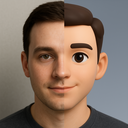
What does the ai_transform emoji mean?
When you're half-human, half-avatar, and 100% ready to glitch.
This emoji captures the popular trend of blending realistic human portraits with stylized 3D avatar aesthetics, often seen in social media profile transformations. It serves as a humorous way to signal a shift in persona, a tech-savvy update, or simply the feeling of being caught between reality and the digital world in a Discord chat.
When to use it
- -showing off a new digital avatar transformation
- -joking about being a bot in real life
- -highlighting a transition between two different personas
- -expressing a split personality during a conversation
Part of these collections
Related emoji searches
More inspired emojis
Embed & share
How to add this emoji
Add to Discord
- Click Add to my server above and pick a Discord server you manage (CommunityOne must be installed).
- Or download the file: open Discord → Server Settings → Emoji → Upload Emoji.
- Give it a name and save. You need Manage Server (or Create Expressions) permission.
Add to Slack
- Download the ai_transform image.
- Open the Slack emoji picker and click Add Emoji.
- Upload the file, name it, and save.
Add to Revolt/Stoat
- Download the ai_transform image.
- Open Server Settings → Emojis in Revolt or Stoat.
- Upload the file and name your new emoji.
Add to Guilded
- Download the ai_transform image.
- Go to Server Settings → Emotes in Guilded.
- Upload the file and give it a name.











