ChatDead
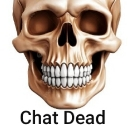
What does the ChatDead emoji mean?
When the conversation hits a brick wall and silence takes over.
The Chat Dead emoji is a staple for any server where the conversation has suddenly screeched to a halt. Featuring a realistic human skull paired with the blunt text 'Chat Dead,' it serves as a humorous way to call out the lack of activity or to mock the awkward silence in a channel.
When to use it
- Calling out a silent and inactive channel
- Highlighting the awkwardness of a dead conversation
- Mocking the lack of replies from others
- Signaling that the chat has become boring
Part of these collections
Related emoji searches
More inspired emojis
Embed & share
How to add this emoji
Add to Discord
- Click Add to my server above and pick a Discord server you manage (CommunityOne must be installed).
- Or download the file: open Discord → Server Settings → Emoji → Upload Emoji.
- Give it a name and save. You need Manage Server (or Create Expressions) permission.
Add to Slack
- Download the ChatDead image.
- Open the Slack emoji picker and click Add Emoji.
- Upload the file, name it, and save.
Add to Revolt/Stoat
- Download the ChatDead image.
- Open Server Settings → Emojis in Revolt or Stoat.
- Upload the file and name your new emoji.
Add to Guilded
- Download the ChatDead image.
- Go to Server Settings → Emotes in Guilded.
- Upload the file and give it a name.











