Confused_Worm
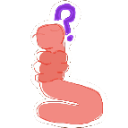
What does the Confused_Worm emoji mean?
A confused little worm trying to make sense of the chaos.
This emoji features a simple, hand-drawn style worm looking visibly puzzled with a question mark hovering above its head. It is a popular choice in Discord servers for reacting to confusing statements, nonsensical arguments, or when someone just doesn't get the joke. Its minimalist design makes it perfect for quick, expressive reactions in fast-paced chat environments.
When to use it
- Reacting to a confusing or nonsensical message
- Expressing genuine bewilderment during a heated debate
- Highlighting that you missed the current context
- Questioning the logic behind a strange statement
Part of these collections
Related emoji searches
More inspired emojis
Embed & share
How to add this emoji
Add to Discord
- Click Add to my server above and pick a Discord server you manage (CommunityOne must be installed).
- Or download the file: open Discord → Server Settings → Emoji → Upload Emoji.
- Give it a name and save. You need Manage Server (or Create Expressions) permission.
Add to Slack
- Download the Confused_Worm image.
- Open the Slack emoji picker and click Add Emoji.
- Upload the file, name it, and save.
Add to Revolt/Stoat
- Download the Confused_Worm image.
- Open Server Settings → Emojis in Revolt or Stoat.
- Upload the file and name your new emoji.
Add to Guilded
- Download the Confused_Worm image.
- Go to Server Settings → Emotes in Guilded.
- Upload the file and give it a name.











