gozum_ustundedi
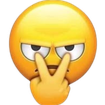
What does the gozum_ustundedi emoji mean?
A classic 'I'm watching you' gesture to keep everyone in line.
This emoji features the iconic 'I'm watching you' hand gesture, where two fingers point from the eyes toward the viewer. It is a staple in Discord servers for signaling suspicion, calling out questionable behavior, or playfully asserting dominance during a debate. It perfectly captures the 'I see what you did there' energy in any chat conversation.
When to use it
- Calling out someone for acting suspicious
- Watching a conversation unfold with deep skepticism
- Warning a user to behave themselves properly
- Signaling that you are monitoring the chat
Part of these collections
Related emoji searches
More inspired emojis
Embed & share
How to add this emoji
Add to Discord
- Click Add to my server above and pick a Discord server you manage (CommunityOne must be installed).
- Or download the file: open Discord → Server Settings → Emoji → Upload Emoji.
- Give it a name and save. You need Manage Server (or Create Expressions) permission.
Add to Slack
- Download the gozum_ustundedi image.
- Open the Slack emoji picker and click Add Emoji.
- Upload the file, name it, and save.
Add to Revolt/Stoat
- Download the gozum_ustundedi image.
- Open Server Settings → Emojis in Revolt or Stoat.
- Upload the file and name your new emoji.
Add to Guilded
- Download the gozum_ustundedi image.
- Go to Server Settings → Emotes in Guilded.
- Upload the file and give it a name.











