emoji_2
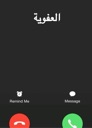
What does the emoji_2 emoji mean?
When you're getting a call you definitely don't want to answer.
This emoji features the classic smartphone incoming call screen, often used to represent the feeling of being called by someone you're avoiding. It captures the universal dread of a ringing phone and the immediate urge to decline. Perfect for Discord servers when a user is being called out or simply wants to express social anxiety.
When to use it
- Declining an unwanted call from a friend
- Expressing anxiety about answering a phone call
- Ignoring a notification during a gaming session
- Showing someone is avoiding their responsibilities today
Part of these collections
Related emoji searches
More inspired emojis
Embed & share
How to add this emoji
Add to Discord
- Click Add to my server above and pick a Discord server you manage (CommunityOne must be installed).
- Or download the file: open Discord → Server Settings → Emoji → Upload Emoji.
- Give it a name and save. You need Manage Server (or Create Expressions) permission.
Add to Slack
- Download the emoji_2 image.
- Open the Slack emoji picker and click Add Emoji.
- Upload the file, name it, and save.
Add to Revolt/Stoat
- Download the emoji_2 image.
- Open Server Settings → Emojis in Revolt or Stoat.
- Upload the file and name your new emoji.
Add to Guilded
- Download the emoji_2 image.
- Go to Server Settings → Emotes in Guilded.
- Upload the file and give it a name.











