legoshi
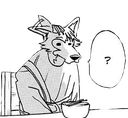
What does the legoshi emoji mean?
Legoshi is genuinely confused by whatever nonsense you just typed.
This emoji features Legoshi, the protagonist of the popular anime and manga series Beastars, looking visibly perplexed with a question mark floating in a speech bubble. It is a staple reaction image in anime-themed Discord servers, perfect for signaling that someone has said something completely baffling or nonsensical.
When to use it
- Reacting to a completely confusing statement
- Expressing genuine bewilderment at weird messages
- Questioning the logic of a bad take
- Highlighting a moment of total social awkwardness
Part of these collections
Related emoji searches
More inspired emojis
Embed & share
How to add this emoji
Add to Discord
- Click Add to my server above and pick a Discord server you manage (CommunityOne must be installed).
- Or download the file: open Discord → Server Settings → Emoji → Upload Emoji.
- Give it a name and save. You need Manage Server (or Create Expressions) permission.
Add to Slack
- Download the legoshi image.
- Open the Slack emoji picker and click Add Emoji.
- Upload the file, name it, and save.
Add to Revolt/Stoat
- Download the legoshi image.
- Open Server Settings → Emojis in Revolt or Stoat.
- Upload the file and name your new emoji.
Add to Guilded
- Download the legoshi image.
- Go to Server Settings → Emotes in Guilded.
- Upload the file and give it a name.











