256X25610
What does the 256X25610 emoji mean?
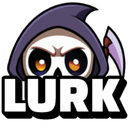
A spooky little reaper peeking out to watch the chat unfold.
This emoji features a stylized, cartoonish Grim Reaper peeking from the bottom of the frame with the word 'LURK' displayed prominently. It is a staple in Discord communities for users who prefer to observe conversations silently without participating, often used to signal that someone is watching the channel activity from the shadows.
When to use it
- Signaling that you are watching the chat
- Admitting to being a silent server member
- Expressing that you are lurking in channels
- Adding a spooky vibe to silent observation
Part of these collections
Related emoji searches
More inspired emojis
Embed & share
How to add this emoji
Add to Discord
- Click Add to my server above and pick a Discord server you manage (CommunityOne must be installed).
- Or download the file: open Discord → Server Settings → Emoji → Upload Emoji.
- Give it a name and save. You need Manage Server (or Create Expressions) permission.
Add to Slack
- Download the 256X25610 image.
- Open the Slack emoji picker and click Add Emoji.
- Upload the file, name it, and save.
Add to Revolt/Stoat
- Download the 256X25610 image.
- Open Server Settings → Emojis in Revolt or Stoat.
- Upload the file and name your new emoji.
Add to Guilded
- Download the 256X25610 image.
- Go to Server Settings → Emotes in Guilded.
- Upload the file and give it a name.











