meow_ping (Animated)
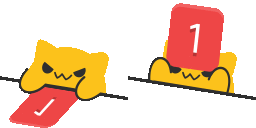
What does the meow_ping emoji mean?
A sassy cat pinging you with a notification badge.
This emoji features a mischievous yellow cat character peeking over a ledge, interacting with a red notification badge. It is widely used in Discord communities to playfully call out a user for being mentioned or to demand attention in a chat. The design captures the persistent and slightly annoying nature of digital pings with a cute, feline twist.
When to use it
- Notifying someone about a new server mention
- Demanding attention from a specific chat member
- Teasing friends about their unread notification count
- Alerting the channel to an important update
Part of these collections
Related emoji searches
More inspired emojis
Embed & share
How to add this emoji
Add to Discord
- Click Add to my server above and pick a Discord server you manage (CommunityOne must be installed).
- Or download the file: open Discord → Server Settings → Emoji → Upload Emoji.
- Give it a name and save. You need Manage Server (or Create Expressions) permission.
Add to Slack
- Download the meow_ping image.
- Open the Slack emoji picker and click Add Emoji.
- Upload the file, name it, and save.
Add to Revolt/Stoat
- Download the meow_ping image.
- Open Server Settings → Emojis in Revolt or Stoat.
- Upload the file and name your new emoji.
Add to Guilded
- Download the meow_ping image.
- Go to Server Settings → Emotes in Guilded.
- Upload the file and give it a name.











