MI_Zen
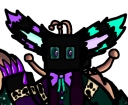
What does the MI_Zen emoji mean?
A mysterious, neon-infused character radiating cool, dark energy.
This emoji features a stylized, box-headed character with glowing neon accents, perfect for adding a touch of edgy, digital flair to your Discord chats. It is commonly used in gaming communities or servers focused on synthwave, dark aesthetics, or original character expression.
When to use it
- Expressing a cool and mysterious digital vibe
- Highlighting a dark or neon aesthetic theme
- Reacting to stylish and edgy character art
- Adding a unique flair to gaming conversations
Part of these collections
Related emoji searches
More inspired emojis
Embed & share
How to add this emoji
Add to Discord
- Click Add to my server above and pick a Discord server you manage (CommunityOne must be installed).
- Or download the file: open Discord → Server Settings → Emoji → Upload Emoji.
- Give it a name and save. You need Manage Server (or Create Expressions) permission.
Add to Slack
- Download the MI_Zen image.
- Open the Slack emoji picker and click Add Emoji.
- Upload the file, name it, and save.
Add to Revolt/Stoat
- Download the MI_Zen image.
- Open Server Settings → Emojis in Revolt or Stoat.
- Upload the file and name your new emoji.
Add to Guilded
- Download the MI_Zen image.
- Go to Server Settings → Emotes in Guilded.
- Upload the file and give it a name.











