MI_Zen_Halloween_Edition
What does the MI_Zen_Halloween_Edition emoji mean?
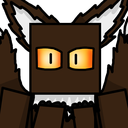
A blocky, mysterious creature with glowing eyes that stares directly into your soul.
This custom emoji features a stylized, block-headed character with piercing, luminous eyes, often used to convey a sense of intense focus or eerie observation. It originates from niche internet character design trends and is perfect for Discord servers that favor minimalist, slightly unsettling, or mysterious aesthetic reactions.
When to use it
- Staring down someone during a heated debate
- Expressing intense focus on a specific message
- Adding a spooky vibe to chat reactions
- Watching silently while others argue in chat
Part of these collections
Related emoji searches
More inspired emojis
Embed & share
How to add this emoji
Add to Discord
- Click Add to my server above and pick a Discord server you manage (CommunityOne must be installed).
- Or download the file: open Discord → Server Settings → Emoji → Upload Emoji.
- Give it a name and save. You need Manage Server (or Create Expressions) permission.
Add to Slack
- Download the MI_Zen_Halloween_Edition image.
- Open the Slack emoji picker and click Add Emoji.
- Upload the file, name it, and save.
Add to Revolt/Stoat
- Download the MI_Zen_Halloween_Edition image.
- Open Server Settings → Emojis in Revolt or Stoat.
- Upload the file and name your new emoji.
Add to Guilded
- Download the MI_Zen_Halloween_Edition image.
- Go to Server Settings → Emotes in Guilded.
- Upload the file and give it a name.











