Norbert
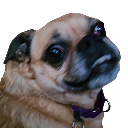
What does the Norbert emoji mean?
A hilariously confused pup giving the ultimate side-eye.
This emoji features Norbert, a famous internet dog known for his distinct, tongue-out expression and bug-eyed stare. It is a staple in Discord servers for reacting to questionable statements, awkward moments, or when you just have no idea what is going on. Its unique, slightly derpy appearance makes it perfect for injecting humor into any conversation.
When to use it
- Reacting to someone saying something completely absurd
- Expressing confusion during a weird chat conversation
- Showing skepticism toward a questionable plan proposed
- Highlighting an awkward moment in the server chat
Part of these collections
Related emoji searches
More inspired emojis
Embed & share
How to add this emoji
Add to Discord
- Click Add to my server above and pick a Discord server you manage (CommunityOne must be installed).
- Or download the file: open Discord → Server Settings → Emoji → Upload Emoji.
- Give it a name and save. You need Manage Server (or Create Expressions) permission.
Add to Slack
- Download the Norbert image.
- Open the Slack emoji picker and click Add Emoji.
- Upload the file, name it, and save.
Add to Revolt/Stoat
- Download the Norbert image.
- Open Server Settings → Emojis in Revolt or Stoat.
- Upload the file and name your new emoji.
Add to Guilded
- Download the Norbert image.
- Go to Server Settings → Emotes in Guilded.
- Upload the file and give it a name.











