emoji_60
Skip the manual upload: CommunityOne can add it straight to your server.
What does the emoji_60 emoji mean?
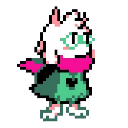
Ralsei peeking out with a shy, adorable grin.
This emoji features Ralsei, the lovable prince of darkness from the indie game Deltarune, peeking from the side of the frame. It is frequently used in gaming communities to express shyness, curiosity, or a gentle, wholesome greeting in chat.
When to use it
- Peeking into a conversation with shy energy
- Showing gentle curiosity about a new topic
- Greeting friends with a soft wholesome vibe
- Expressing quiet support for a friend's idea
Part of these collections
Related emoji searches
More inspired emojis
Embed & share
How to add this emoji
Add to Discord
- Click Add to my server above and pick a Discord server you manage (CommunityOne must be installed).
- Or download the file: open Discord → Server Settings → Emoji → Upload Emoji.
- Give it a name and save. You need Manage Server (or Create Expressions) permission.
Add to Slack
- Download the emoji_60 image.
- Open the Slack emoji picker and click Add Emoji.
- Upload the file, name it, and save.
Add to Revolt/Stoat
- Download the emoji_60 image.
- Open Server Settings → Emojis in Revolt or Stoat.
- Upload the file and name your new emoji.
Add to Guilded
- Download the emoji_60 image.
- Go to Server Settings → Emotes in Guilded.
- Upload the file and give it a name.











