IMG_1100
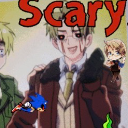
What does the IMG_1100 emoji mean?
A chaotic crossover featuring a creepy anime character and Sonic for maximum internet weirdness.
This emoji combines elements from the Hetalia fandom with the infamous Sonic.exe creepypasta aesthetic. It is perfect for Discord servers that embrace surreal humor, ironic meme culture, or niche anime fandoms. Use it to signal that things are about to get weird or unsettling in the chat.
When to use it
- Expressing confusion during a bizarre conversation
- Highlighting an unsettling or cursed moment
- Reacting to chaotic or nonsensical messages
- Signaling spooky vibes in a chat
Part of these collections
Related emoji searches
More inspired emojis
Embed & share
How to add this emoji
Add to Discord
- Click Add to my server above and pick a Discord server you manage (CommunityOne must be installed).
- Or download the file: open Discord → Server Settings → Emoji → Upload Emoji.
- Give it a name and save. You need Manage Server (or Create Expressions) permission.
Add to Slack
- Download the IMG_1100 image.
- Open the Slack emoji picker and click Add Emoji.
- Upload the file, name it, and save.
Add to Revolt/Stoat
- Download the IMG_1100 image.
- Open Server Settings → Emojis in Revolt or Stoat.
- Upload the file and name your new emoji.
Add to Guilded
- Download the IMG_1100 image.
- Go to Server Settings → Emotes in Guilded.
- Upload the file and give it a name.











