Shadow_Shocked
What does the Shadow_Shocked emoji mean?
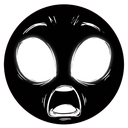
A dark, shadowy figure struck by sudden, wide-eyed terror.
This emoji features a stylized, shadowy silhouette with glowing white eyes and a gaping mouth, capturing a moment of pure, existential shock. It is heavily inspired by the distinct, hand-drawn art style of the game Don't Starve, making it a perfect addition for gaming servers or any community that appreciates dark, gothic humor. Use it to react to unexpected plot twists, terrifying game moments, or just to express genuine disbelief in chat.
When to use it
- Reacting to a sudden jump scare in games
- Expressing disbelief at a shocking news update
- Highlighting a moment of pure chaotic energy
- Responding to an unexpected and wild revelation
Part of these collections
Related emoji searches
More inspired emojis
Embed & share
How to add this emoji
Add to Discord
- Click Add to my server above and pick a Discord server you manage (CommunityOne must be installed).
- Or download the file: open Discord → Server Settings → Emoji → Upload Emoji.
- Give it a name and save. You need Manage Server (or Create Expressions) permission.
Add to Slack
- Download the Shadow_Shocked image.
- Open the Slack emoji picker and click Add Emoji.
- Upload the file, name it, and save.
Add to Revolt/Stoat
- Download the Shadow_Shocked image.
- Open Server Settings → Emojis in Revolt or Stoat.
- Upload the file and name your new emoji.
Add to Guilded
- Download the Shadow_Shocked image.
- Go to Server Settings → Emotes in Guilded.
- Upload the file and give it a name.











