_STAR_emoji_134
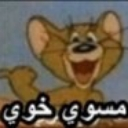
What does the _STAR_emoji_134 emoji mean?
Jerry the mouse giving a mischievous, knowing grin.
This emoji features Jerry from Tom & Jerry with a wide, cheeky smile, paired with the Arabic text 'مسوي خوي' which translates to 'acting like a friend' or 'playing the buddy.' It is commonly used in Arab internet culture to sarcastically call out someone who is acting fake, being overly friendly for ulterior motives, or playing the 'nice guy' role.
When to use it
- Calling out someone acting fake in chat
- Mocking a friend who is being suspicious
- Reacting to someone pretending to be nice
- Highlighting a sarcastic or insincere friendly gesture
Part of these collections
Related emoji searches
More inspired emojis
Embed & share
How to add this emoji
Add to Discord
- Click Add to my server above and pick a Discord server you manage (CommunityOne must be installed).
- Or download the file: open Discord → Server Settings → Emoji → Upload Emoji.
- Give it a name and save. You need Manage Server (or Create Expressions) permission.
Add to Slack
- Download the _STAR_emoji_134 image.
- Open the Slack emoji picker and click Add Emoji.
- Upload the file, name it, and save.
Add to Revolt/Stoat
- Download the _STAR_emoji_134 image.
- Open Server Settings → Emojis in Revolt or Stoat.
- Upload the file and name your new emoji.
Add to Guilded
- Download the _STAR_emoji_134 image.
- Go to Server Settings → Emotes in Guilded.
- Upload the file and give it a name.











