upshut
What does the upshut emoji mean?
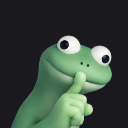
A cute green frog signaling for silence with a mischievous grin.
This emoji features a 3D-rendered green frog holding a finger to its mouth in a 'shush' gesture. It is a popular reaction in Discord servers for moments when someone says something controversial, secret, or when the chat needs to quiet down. The frog's wide, expressive eyes and subtle smirk make it a versatile tool for playful secrecy or lighthearted trolling.
When to use it
- Telling someone to keep a secret quiet
- Signaling for silence during a chaotic chat
- Reacting to a scandalous piece of gossip
- Playfully shushing someone for being too loud
Part of these collections
Related emoji searches
More inspired emojis
Embed & share
How to add this emoji
Add to Discord
- Click Add to my server above and pick a Discord server you manage (CommunityOne must be installed).
- Or download the file: open Discord → Server Settings → Emoji → Upload Emoji.
- Give it a name and save. You need Manage Server (or Create Expressions) permission.
Add to Slack
- Download the upshut image.
- Open the Slack emoji picker and click Add Emoji.
- Upload the file, name it, and save.
Add to Revolt/Stoat
- Download the upshut image.
- Open Server Settings → Emojis in Revolt or Stoat.
- Upload the file and name your new emoji.
Add to Guilded
- Download the upshut image.
- Go to Server Settings → Emotes in Guilded.
- Upload the file and give it a name.











