WHOPINGEDMEEEE
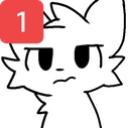
What does the WHOPINGEDMEEEE emoji mean?
A suspicious cat-like creature wondering who dared to ping them.
This emoji features a stylized, white, cat-like character with a skeptical expression, overlaid with a classic red notification badge. It is a staple in Discord communities for expressing annoyance or suspicion when receiving an unexpected notification or mention. The design draws from internet meme culture, specifically the 'boykisser' art style, and is used to call out pings in chat.
When to use it
- Expressing annoyance at receiving an unexpected ping
- Questioning who tagged you in a server
- Showing suspicion toward a random notification alert
- Reacting to an annoying mention in chat
Part of these collections
Related emoji searches
More inspired emojis
Embed & share
How to add this emoji
Add to Discord
- Click Add to my server above and pick a Discord server you manage (CommunityOne must be installed).
- Or download the file: open Discord → Server Settings → Emoji → Upload Emoji.
- Give it a name and save. You need Manage Server (or Create Expressions) permission.
Add to Slack
- Download the WHOPINGEDMEEEE image.
- Open the Slack emoji picker and click Add Emoji.
- Upload the file, name it, and save.
Add to Revolt/Stoat
- Download the WHOPINGEDMEEEE image.
- Open Server Settings → Emojis in Revolt or Stoat.
- Upload the file and name your new emoji.
Add to Guilded
- Download the WHOPINGEDMEEEE image.
- Go to Server Settings → Emotes in Guilded.
- Upload the file and give it a name.











