__
What does the __ emoji mean?
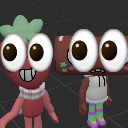
Two quirky, wide-eyed characters staring blankly into your soul.
This emoji features two stylized 3D characters with comically oversized, unblinking eyes that create an unsettling yet hilarious effect. Often used in Discord servers to express confusion, judgment, or a 'thousand-yard stare' reaction to bizarre messages, it has become a staple for ironic humor and meme-heavy communities.
When to use it
- -reacting to a completely nonsensical chat message
- -expressing deep confusion at a strange situation
- -staring blankly at someone's questionable life choices
- -highlighting an awkward moment in the conversation
Part of these collections
Related emoji searches
More inspired emojis
Embed & share
How to add this emoji
Add to Discord
- Click Add to my server above and pick a Discord server you manage (CommunityOne must be installed).
- Or download the file: open Discord → Server Settings → Emoji → Upload Emoji.
- Give it a name and save. You need Manage Server (or Create Expressions) permission.
Add to Slack
- Download the __ image.
- Open the Slack emoji picker and click Add Emoji.
- Upload the file, name it, and save.
Add to Revolt/Stoat
- Download the __ image.
- Open Server Settings → Emojis in Revolt or Stoat.
- Upload the file and name your new emoji.
Add to Guilded
- Download the __ image.
- Go to Server Settings → Emotes in Guilded.
- Upload the file and give it a name.











