yes
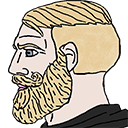
What does the yes emoji mean?
The ultimate symbol of unwavering confidence and Chad-like approval.
This emoji features the iconic 'Nordic Gamer' or 'Chad' meme character, known for his stoic, chiseled profile and blonde beard. In internet culture, this character represents someone who is unbothered by criticism and confident in their own opinions. It is frequently used in Discord servers to signal agreement, show superiority, or mock those who are getting worked up over trivial matters.
When to use it
- Agreeing with a based take in chat
- Showing confidence in a controversial opinion
- Dismissing an argument with stoic silence
- Flexing your superiority in a debate
Part of these collections
Related emoji searches
More inspired emojis
Embed & share
How to add this emoji
Add to Discord
- Click Add to my server above and pick a Discord server you manage (CommunityOne must be installed).
- Or download the file: open Discord → Server Settings → Emoji → Upload Emoji.
- Give it a name and save. You need Manage Server (or Create Expressions) permission.
Add to Slack
- Download the yes image.
- Open the Slack emoji picker and click Add Emoji.
- Upload the file, name it, and save.
Add to Revolt/Stoat
- Download the yes image.
- Open Server Settings → Emojis in Revolt or Stoat.
- Upload the file and name your new emoji.
Add to Guilded
- Download the yes image.
- Go to Server Settings → Emotes in Guilded.
- Upload the file and give it a name.











