b5ef0387b9d5bf5feba6d6d6f93f0e4d
¿Qué significa el emoji b5ef0387b9d5bf5feba6d6d6f93f0e4d?
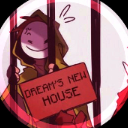
Dream is locked away in his new home, and he seems weirdly happy about it.
This emoji features the popular Minecraft YouTuber Dream behind prison bars, holding a sign that reads 'Dream's New House'. It references the infamous 'Pandora's Vault' prison arc from the Dream SMP, where the character was famously imprisoned. It is frequently used in gaming communities to mock someone being banned, muted, or simply to reference the iconic Minecraft lore.
Cuándo usarlo
- Joking about someone getting banned from chat
- Mocking a friend who is stuck in jail
- Referencing the iconic Dream SMP prison arc
- Teasing someone who is trapped in game
Parte de estas colecciones
Related emoji searches
More inspired emojis
Insertar y compartir
Cómo añadir este emoji
Añadir a Discord
- Haz clic en Añadir a mi servidor arriba y elige un servidor de Discord que administres (CommunityOne debe estar instalado).
- O descarga el archivo: abre Discord → Ajustes del servidor → Emoji → Subir emoji.
- Dale un nombre y guarda. Necesitas el permiso Administrar servidor (o Crear expresiones).
Añadir a Slack
- Descarga la imagen de b5ef0387b9d5bf5feba6d6d6f93f0e4d.
- Abre el selector de emojis de Slack y haz clic en Añadir emoji.
- Sube el archivo, ponle un nombre y guarda.
Añadir a Revolt/Stoat
- Descarga la imagen de b5ef0387b9d5bf5feba6d6d6f93f0e4d.
- Abre Ajustes del servidor → Emojis en Revolt o Stoat.
- Sube el archivo y pon nombre a tu nuevo emoji.
Añadir a Guilded
- Descarga la imagen de b5ef0387b9d5bf5feba6d6d6f93f0e4d.
- Ve a Ajustes del servidor → Emotes en Guilded.
- Sube el archivo y dale un nombre.











