froghug
Skip the manual upload: CommunityOne can add it straight to your server.
¿Qué significa el emoji froghug?
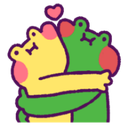
A warm, fuzzy embrace between two best froggy friends.
This adorable emoji features two frogs, one yellow and one green, sharing a tight, loving hug. It is a staple in Discord servers for expressing affection, support, or simple wholesome camaraderie between friends. The minimalist, cute aesthetic makes it perfect for softening the tone of any chat conversation.
Cuándo usarlo
- Sending love to a friend in chat
- Showing support during a difficult time
- Celebrating a wholesome moment between users
- Greeting a friend with a virtual hug
Also known as:
:frog_hug:
Parte de estas colecciones
Related emoji searches
More inspired emojis
Insertar y compartir
Cómo añadir este emoji
Añadir a Discord
- Haz clic en Añadir a mi servidor arriba y elige un servidor de Discord que administres (CommunityOne debe estar instalado).
- O descarga el archivo: abre Discord → Ajustes del servidor → Emoji → Subir emoji.
- Dale un nombre y guarda. Necesitas el permiso Administrar servidor (o Crear expresiones).
Añadir a Slack
- Descarga la imagen de froghug.
- Abre el selector de emojis de Slack y haz clic en Añadir emoji.
- Sube el archivo, ponle un nombre y guarda.
Añadir a Revolt/Stoat
- Descarga la imagen de froghug.
- Abre Ajustes del servidor → Emojis en Revolt o Stoat.
- Sube el archivo y pon nombre a tu nuevo emoji.
Añadir a Guilded
- Descarga la imagen de froghug.
- Ve a Ajustes del servidor → Emotes en Guilded.
- Sube el archivo y dale un nombre.











