it_miku
Que signifie l’emoji it_miku ?
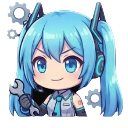
Hatsune Miku is ready to fix all your technical problems with a smirk.
This emoji features a chibi-style Hatsune Miku holding a wrench, representing the 'tech support' or 'engineer' persona often associated with Vocaloid fan art. It is perfect for Discord servers where users are troubleshooting code, fixing server issues, or simply showing off their tech-savvy side with a cute anime aesthetic.
Quand l’utiliser
- Indicating you are currently fixing technical issues
- Showing off your coding or engineering skills
- Replying to someone who broke the server
- Signaling that you are working on something
Dans ces collections
Related emoji searches
More inspired emojis
Intégrer et partager
Comment ajouter cet emoji
Add to Discord
- Cliquez sur Ajouter à mon serveur ci-dessus et choisissez un serveur Discord que vous gérez (CommunityOne doit être installé).
- Ou téléchargez le fichier : ouvrez Discord → Paramètres du serveur → Emoji → Importer un emoji.
- Donnez-lui un nom et enregistrez. Vous avez besoin de la permission Gérer le serveur (ou Créer des expressions).
Ajouter à Slack
- Téléchargez l’image it_miku.
- Ouvrez le sélecteur d’emojis Slack et cliquez sur Ajouter un emoji.
- Importez le fichier, nommez-le et enregistrez.
Ajouter à Revolt/Stoat
- Téléchargez l’image it_miku.
- Ouvrez Paramètres du serveur → Emojis dans Revolt ou Stoat.
- Importez le fichier et nommez votre nouvel emoji.
Ajouter à Guilded
- Téléchargez l’image it_miku.
- Allez dans Paramètres du serveur → Emotes dans Guilded.
- Importez le fichier et donnez-lui un nom.











