jder
Que signifie l’emoji jder ?
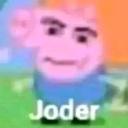
A cursed Peppa Pig edit that perfectly captures the feeling of utter disbelief.
This emoji features a distorted, deep-fried edit of Peppa Pig with hyper-realistic human features and the Spanish caption 'Joder'. It is a staple of internet shitposting culture, used to express shock, frustration, or a 'what the hell' reaction in Discord servers. The juxtaposition of a children's character with uncanny human eyes and a vulgar exclamation makes it a classic meme for ironic humor.
Quand l’utiliser
- -expressing disbelief at a bizarre chat message
- -reacting to an incredibly cursed image post
- -showing frustration with a ridiculous situation
- -mocking someone for saying something stupid
Dans ces collections
Related emoji searches
More inspired emojis
Intégrer et partager
Comment ajouter cet emoji
Add to Discord
- Cliquez sur Ajouter à mon serveur ci-dessus et choisissez un serveur Discord que vous gérez (CommunityOne doit être installé).
- Ou téléchargez le fichier : ouvrez Discord → Paramètres du serveur → Emoji → Importer un emoji.
- Donnez-lui un nom et enregistrez. Vous avez besoin de la permission Gérer le serveur (ou Créer des expressions).
Ajouter à Slack
- Téléchargez l’image jder.
- Ouvrez le sélecteur d’emojis Slack et cliquez sur Ajouter un emoji.
- Importez le fichier, nommez-le et enregistrez.
Ajouter à Revolt/Stoat
- Téléchargez l’image jder.
- Ouvrez Paramètres du serveur → Emojis dans Revolt ou Stoat.
- Importez le fichier et nommez votre nouvel emoji.
Ajouter à Guilded
- Téléchargez l’image jder.
- Allez dans Paramètres du serveur → Emotes dans Guilded.
- Importez le fichier et donnez-lui un nom.











