hehe
Skip the manual upload: CommunityOne can add it straight to your server.
O que significa o emoji hehe?
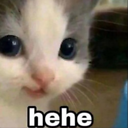
A tiny, mischievous kitten with a knowing grin that says you're definitely up to something.
This iconic 'hehe' cat meme features a close-up of a kitten with a subtle, sly expression, often used to convey playful malice or secret amusement. It is a staple in Discord servers for reacting to inside jokes, trolling, or acknowledging a devious plan. The simple text overlay perfectly captures the feeling of being up to no good.
Quando usar
- Reacting to a friend's silly devious plan
- Expressing secret amusement at a funny joke
- Teasing someone after a successful lighthearted prank
- Acknowledging a chaotic moment in the chat
Also known as:
:hehehe:
Parte destas coleções
Related emoji searches
More inspired emojis
Incorporar e partilhar
Como adicionar este emoji
Add to Discord
- Clique em Adicionar ao meu servidor acima e escolha um servidor Discord que administra (a CommunityOne deve estar instalada).
- Ou descarregue o ficheiro: abra o Discord → Definições do servidor → Emoji → Carregar emoji.
- Dê-lhe um nome e guarde. Precisa da permissão Gerir servidor (ou Criar expressões).
Adicionar ao Slack
- Descarregue a imagem hehe.
- Abra o seletor de emojis do Slack e clique em Adicionar emoji.
- Carregue o ficheiro, dê-lhe um nome e guarde.
Adicionar ao Revolt/Stoat
- Descarregue a imagem hehe.
- Abra Definições do servidor → Emojis no Revolt ou Stoat.
- Carregue o ficheiro e dê um nome ao novo emoji.
Adicionar ao Guilded
- Descarregue a imagem hehe.
- Vá a Definições do servidor → Emotes no Guilded.
- Carregue o ficheiro e dê-lhe um nome.











