emoji_2
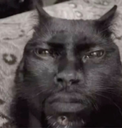
What does the emoji_2 emoji mean?
The ultimate 'bruh' moment captured in a single, cursed cat face.
This image is a classic example of a 'cursed' meme, featuring a black cat whose face has been digitally morphed to resemble a human expression of intense judgment or disbelief. It is widely used in Discord servers to react to questionable takes, awkward situations, or when someone says something so ridiculous that words fail you. Its grainy, low-quality aesthetic adds to the comedic impact, making it a staple for ironic humor.
When to use it
- Reacting to someone saying something completely ridiculous
- Expressing deep disbelief at a bad take
- Showing silent judgment during an awkward conversation
- Responding to a cursed or weird message
Part of these collections
Related emoji searches
More inspired emojis
Embed & share
How to add this emoji
Add to Discord
- Click Add to my server above and pick a Discord server you manage (CommunityOne must be installed).
- Or download the file: open Discord → Server Settings → Emoji → Upload Emoji.
- Give it a name and save. You need Manage Server (or Create Expressions) permission.
Add to Slack
- Download the emoji_2 image.
- Open the Slack emoji picker and click Add Emoji.
- Upload the file, name it, and save.
Add to Revolt/Stoat
- Download the emoji_2 image.
- Open Server Settings → Emojis in Revolt or Stoat.
- Upload the file and name your new emoji.
Add to Guilded
- Download the emoji_2 image.
- Go to Server Settings → Emotes in Guilded.
- Upload the file and give it a name.











