dlaugh
¿Qué significa el emoji dlaugh?
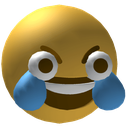
A chaotic, wide-eyed take on the classic laughing emoji that screams pure hysterical madness.
This emoji is a distorted, high-energy variation of the traditional laughing-crying face, often used to convey extreme amusement or manic laughter. Its exaggerated, bulging eyes and intense expression make it a staple in Discord servers for reacting to absurd memes, chaotic moments, or situations that are just too funny to handle normally. It captures the specific internet culture vibe of 'dying of laughter' in a way that feels slightly unhinged and deeply relatable.
Cuándo usarlo
- Reacting to an absolutely absurd meme post
- Expressing uncontrollable laughter at a funny joke
- Showing disbelief at a chaotic chat moment
- Highlighting a truly hilarious and ridiculous situation
Also known as:
:3dLaughCryDankAFWtf: :3D_laugh:
Parte de estas colecciones
Related emoji searches
More inspired emojis
Insertar y compartir
Cómo añadir este emoji
Añadir a Discord
- Haz clic en Añadir a mi servidor arriba y elige un servidor de Discord que administres (CommunityOne debe estar instalado).
- O descarga el archivo: abre Discord → Ajustes del servidor → Emoji → Subir emoji.
- Dale un nombre y guarda. Necesitas el permiso Administrar servidor (o Crear expresiones).
Añadir a Slack
- Descarga la imagen de dlaugh.
- Abre el selector de emojis de Slack y haz clic en Añadir emoji.
- Sube el archivo, ponle un nombre y guarda.
Añadir a Revolt/Stoat
- Descarga la imagen de dlaugh.
- Abre Ajustes del servidor → Emojis en Revolt o Stoat.
- Sube el archivo y pon nombre a tu nuevo emoji.
Añadir a Guilded
- Descarga la imagen de dlaugh.
- Ve a Ajustes del servidor → Emotes en Guilded.
- Sube el archivo y dale un nombre.











