blazea_rage_notification
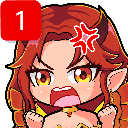
¿Qué significa el emoji blazea_rage_notification?
When your notifications are piling up and you've officially reached your limit.
This emoji features an anime-style character with a classic 'angry vein' symbol, perfectly capturing the frustration of dealing with an overflowing inbox or endless pings. It is a staple for Discord servers where users want to express irritation at being overwhelmed by alerts or persistent notifications. The design blends cute aesthetics with relatable digital-age rage.
Cuándo usarlo
- Expressing frustration at too many server pings
- Showing annoyance when ignored by other users
- Reacting to a massive backlog of unread messages
- Highlighting the stress of constant digital alerts
Parte de estas colecciones
Related emoji searches
More inspired emojis
Insertar y compartir
Cómo añadir este emoji
Añadir a Discord
- Haz clic en Añadir a mi servidor arriba y elige un servidor de Discord que administres (CommunityOne debe estar instalado).
- O descarga el archivo: abre Discord → Ajustes del servidor → Emoji → Subir emoji.
- Dale un nombre y guarda. Necesitas el permiso Administrar servidor (o Crear expresiones).
Añadir a Slack
- Descarga la imagen de blazea_rage_notification.
- Abre el selector de emojis de Slack y haz clic en Añadir emoji.
- Sube el archivo, ponle un nombre y guarda.
Añadir a Revolt/Stoat
- Descarga la imagen de blazea_rage_notification.
- Abre Ajustes del servidor → Emojis en Revolt o Stoat.
- Sube el archivo y pon nombre a tu nuevo emoji.
Añadir a Guilded
- Descarga la imagen de blazea_rage_notification.
- Ve a Ajustes del servidor → Emotes en Guilded.
- Sube el archivo y dale un nombre.











