blazea_rage_notification
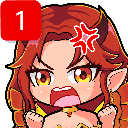
Que signifie l’emoji blazea_rage_notification ?
When your notifications are piling up and you've officially reached your limit.
This emoji features an anime-style character with a classic 'angry vein' symbol, perfectly capturing the frustration of dealing with an overflowing inbox or endless pings. It is a staple for Discord servers where users want to express irritation at being overwhelmed by alerts or persistent notifications. The design blends cute aesthetics with relatable digital-age rage.
Quand l’utiliser
- Expressing frustration at too many server pings
- Showing annoyance when ignored by other users
- Reacting to a massive backlog of unread messages
- Highlighting the stress of constant digital alerts
Dans ces collections
Related emoji searches
More inspired emojis
Intégrer et partager
Comment ajouter cet emoji
Add to Discord
- Cliquez sur Ajouter à mon serveur ci-dessus et choisissez un serveur Discord que vous gérez (CommunityOne doit être installé).
- Ou téléchargez le fichier : ouvrez Discord → Paramètres du serveur → Emoji → Importer un emoji.
- Donnez-lui un nom et enregistrez. Vous avez besoin de la permission Gérer le serveur (ou Créer des expressions).
Ajouter à Slack
- Téléchargez l’image blazea_rage_notification.
- Ouvrez le sélecteur d’emojis Slack et cliquez sur Ajouter un emoji.
- Importez le fichier, nommez-le et enregistrez.
Ajouter à Revolt/Stoat
- Téléchargez l’image blazea_rage_notification.
- Ouvrez Paramètres du serveur → Emojis dans Revolt ou Stoat.
- Importez le fichier et nommez votre nouvel emoji.
Ajouter à Guilded
- Téléchargez l’image blazea_rage_notification.
- Allez dans Paramètres du serveur → Emotes dans Guilded.
- Importez le fichier et donnez-lui un nom.











