hehe
¿Qué significa el emoji hehe?
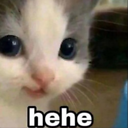
A mischievous kitten with a knowing smirk, perfect for when you're up to no good.
This iconic 'hehe' cat meme features a close-up of a kitten with a subtle, human-like smirk that perfectly captures a sense of playful malice or secret amusement. It is a staple in Discord servers for reacting to inside jokes, trolling, or signaling that you are plotting something silly. The simple 'hehe' text overlay makes it an instantly recognizable reaction for any lighthearted or chaotic conversation.
Cuándo usarlo
- Signaling that you are plotting something mischievous
- Reacting to a funny or chaotic inside joke
- Teasing a friend during a lighthearted argument
- Showing you are up to no good today
Also known as:
:hehehe: :hsrt_hehe:
Parte de estas colecciones
Related emoji searches
More inspired emojis
Insertar y compartir
Cómo añadir este emoji
Añadir a Discord
- Haz clic en Añadir a mi servidor arriba y elige un servidor de Discord que administres (CommunityOne debe estar instalado).
- O descarga el archivo: abre Discord → Ajustes del servidor → Emoji → Subir emoji.
- Dale un nombre y guarda. Necesitas el permiso Administrar servidor (o Crear expresiones).
Añadir a Slack
- Descarga la imagen de hehe.
- Abre el selector de emojis de Slack y haz clic en Añadir emoji.
- Sube el archivo, ponle un nombre y guarda.
Añadir a Revolt/Stoat
- Descarga la imagen de hehe.
- Abre Ajustes del servidor → Emojis en Revolt o Stoat.
- Sube el archivo y pon nombre a tu nuevo emoji.
Añadir a Guilded
- Descarga la imagen de hehe.
- Ve a Ajustes del servidor → Emotes en Guilded.
- Sube el archivo y dale un nombre.











