3481_Pepecaught_original (Animado)
Skip the manual upload: CommunityOne can add it straight to your server.
¿Qué significa el emoji 3481_Pepecaught_original?
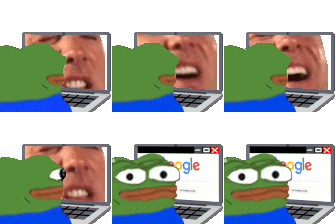
Pepe gets a sudden reality check while browsing the internet.
This animated emoji features Pepe the Frog sitting at a laptop, initially watching a chaotic, screaming face before suddenly switching to a calm Google search screen. It perfectly captures the feeling of abruptly stopping a questionable activity when someone walks into the room or when you realize you've gone too far. It is a staple in Discord servers for moments of sudden realization, awkward transitions, or hiding one's true browsing habits.
Cuándo usarlo
- Hiding your browser history from others
- Transitioning to a serious topic abruptly
- Stopping a weird video when someone enters
- Pretending to be productive while procrastinating
Also known as:
:oh:
Parte de estas colecciones
Related emoji searches
More inspired emojis
Insertar y compartir
Cómo añadir este emoji
Añadir a Discord
- Haz clic en Añadir a mi servidor arriba y elige un servidor de Discord que administres (CommunityOne debe estar instalado).
- O descarga el archivo: abre Discord → Ajustes del servidor → Emoji → Subir emoji.
- Dale un nombre y guarda. Necesitas el permiso Administrar servidor (o Crear expresiones).
Añadir a Slack
- Descarga la imagen de 3481_Pepecaught_original.
- Abre el selector de emojis de Slack y haz clic en Añadir emoji.
- Sube el archivo, ponle un nombre y guarda.
Añadir a Revolt/Stoat
- Descarga la imagen de 3481_Pepecaught_original.
- Abre Ajustes del servidor → Emojis en Revolt o Stoat.
- Sube el archivo y pon nombre a tu nuevo emoji.
Añadir a Guilded
- Descarga la imagen de 3481_Pepecaught_original.
- Ve a Ajustes del servidor → Emotes en Guilded.
- Sube el archivo y dale un nombre.











