3481_Pepecaught_original (Animado)
Skip the manual upload: CommunityOne can add it straight to your server.
O que significa o emoji 3481_Pepecaught_original?
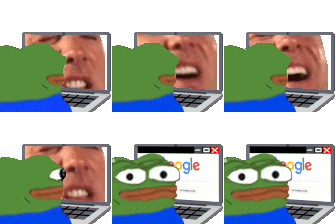
Pepe gets a sudden reality check while browsing the internet.
This animated emoji features Pepe the Frog sitting at a laptop, initially watching a chaotic, screaming face before suddenly switching to a calm Google search screen. It perfectly captures the feeling of abruptly stopping a questionable activity when someone walks into the room or when you realize you've gone too far. It is a staple in Discord servers for moments of sudden realization, awkward transitions, or hiding one's true browsing habits.
Quando usar
- Hiding your browser history from others
- Transitioning to a serious topic abruptly
- Stopping a weird video when someone enters
- Pretending to be productive while procrastinating
Also known as:
:oh:
Parte destas coleções
Related emoji searches
More inspired emojis
Incorporar e partilhar
Como adicionar este emoji
Add to Discord
- Clique em Adicionar ao meu servidor acima e escolha um servidor Discord que administra (a CommunityOne deve estar instalada).
- Ou descarregue o ficheiro: abra o Discord → Definições do servidor → Emoji → Carregar emoji.
- Dê-lhe um nome e guarde. Precisa da permissão Gerir servidor (ou Criar expressões).
Adicionar ao Slack
- Descarregue a imagem 3481_Pepecaught_original.
- Abra o seletor de emojis do Slack e clique em Adicionar emoji.
- Carregue o ficheiro, dê-lhe um nome e guarde.
Adicionar ao Revolt/Stoat
- Descarregue a imagem 3481_Pepecaught_original.
- Abra Definições do servidor → Emojis no Revolt ou Stoat.
- Carregue o ficheiro e dê um nome ao novo emoji.
Adicionar ao Guilded
- Descarregue a imagem 3481_Pepecaught_original.
- Vá a Definições do servidor → Emotes no Guilded.
- Carregue o ficheiro e dê-lhe um nome.











