dlaugh
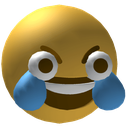
What does the dlaugh emoji mean?
A chaotic, wide-eyed take on the classic laughing emoji that screams pure hysterical madness.
This emoji is a distorted, high-energy variation of the traditional laughing-crying face, often used to convey extreme amusement or manic laughter. Its exaggerated, bulging eyes and intense expression make it a staple in Discord servers for reacting to absurd memes, chaotic moments, or situations that are just too funny to handle normally. It captures the specific internet culture vibe of 'dying of laughter' in a way that feels slightly unhinged and deeply relatable.
When to use it
- Reacting to an absolutely absurd meme post
- Expressing uncontrollable laughter at a funny joke
- Showing disbelief at a chaotic chat moment
- Highlighting a truly hilarious and ridiculous situation
Also known as:
:3dLaughCryDankAFWtf: :3D_laugh:
Part of these collections
Related emoji searches
More inspired emojis
Embed & share
How to add this emoji
Add to Discord
- Click Add to my server above and pick a Discord server you manage (CommunityOne must be installed).
- Or download the file: open Discord → Server Settings → Emoji → Upload Emoji.
- Give it a name and save. You need Manage Server (or Create Expressions) permission.
Add to Slack
- Download the dlaugh image.
- Open the Slack emoji picker and click Add Emoji.
- Upload the file, name it, and save.
Add to Revolt/Stoat
- Download the dlaugh image.
- Open Server Settings → Emojis in Revolt or Stoat.
- Upload the file and name your new emoji.
Add to Guilded
- Download the dlaugh image.
- Go to Server Settings → Emotes in Guilded.
- Upload the file and give it a name.











