Ernest
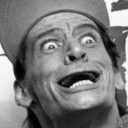
What does the Ernest emoji mean?
Channel your inner Ernest P. Worrell with this iconic, wide-eyed grin.
This emoji features the unmistakable face of Jim Varney's beloved character, Ernest P. Worrell. Widely recognized from his 80s and 90s film and commercial series, this expression captures his signature manic, wide-eyed enthusiasm. It is perfect for Discord servers looking to add a touch of nostalgic, slapstick comedy or to express genuine, over-the-top excitement.
When to use it
- Expressing over-the-top excitement for a new update
- Reacting to a hilariously bad joke in chat
- Showing genuine shock at a surprising server event
- Embodying pure chaotic energy during a gaming session
Part of these collections
Related emoji searches
More inspired emojis
Embed & share
How to add this emoji
Add to Discord
- Click Add to my server above and pick a Discord server you manage (CommunityOne must be installed).
- Or download the file: open Discord → Server Settings → Emoji → Upload Emoji.
- Give it a name and save. You need Manage Server (or Create Expressions) permission.
Add to Slack
- Download the Ernest image.
- Open the Slack emoji picker and click Add Emoji.
- Upload the file, name it, and save.
Add to Revolt/Stoat
- Download the Ernest image.
- Open Server Settings → Emojis in Revolt or Stoat.
- Upload the file and name your new emoji.
Add to Guilded
- Download the Ernest image.
- Go to Server Settings → Emotes in Guilded.
- Upload the file and give it a name.











